DeepWell
Private offline AI · macOS · no account

A knowledgeable assistant that works when the grid doesn't.

DeepWell runs entirely on your Mac. No internet, no cloud, no sign-up. Download it, open it, ask. It is also the simplest way to run AI locally on almost any Mac, including aging Intel machines.

Works fully offline Nothing leaves your Mac No subscription
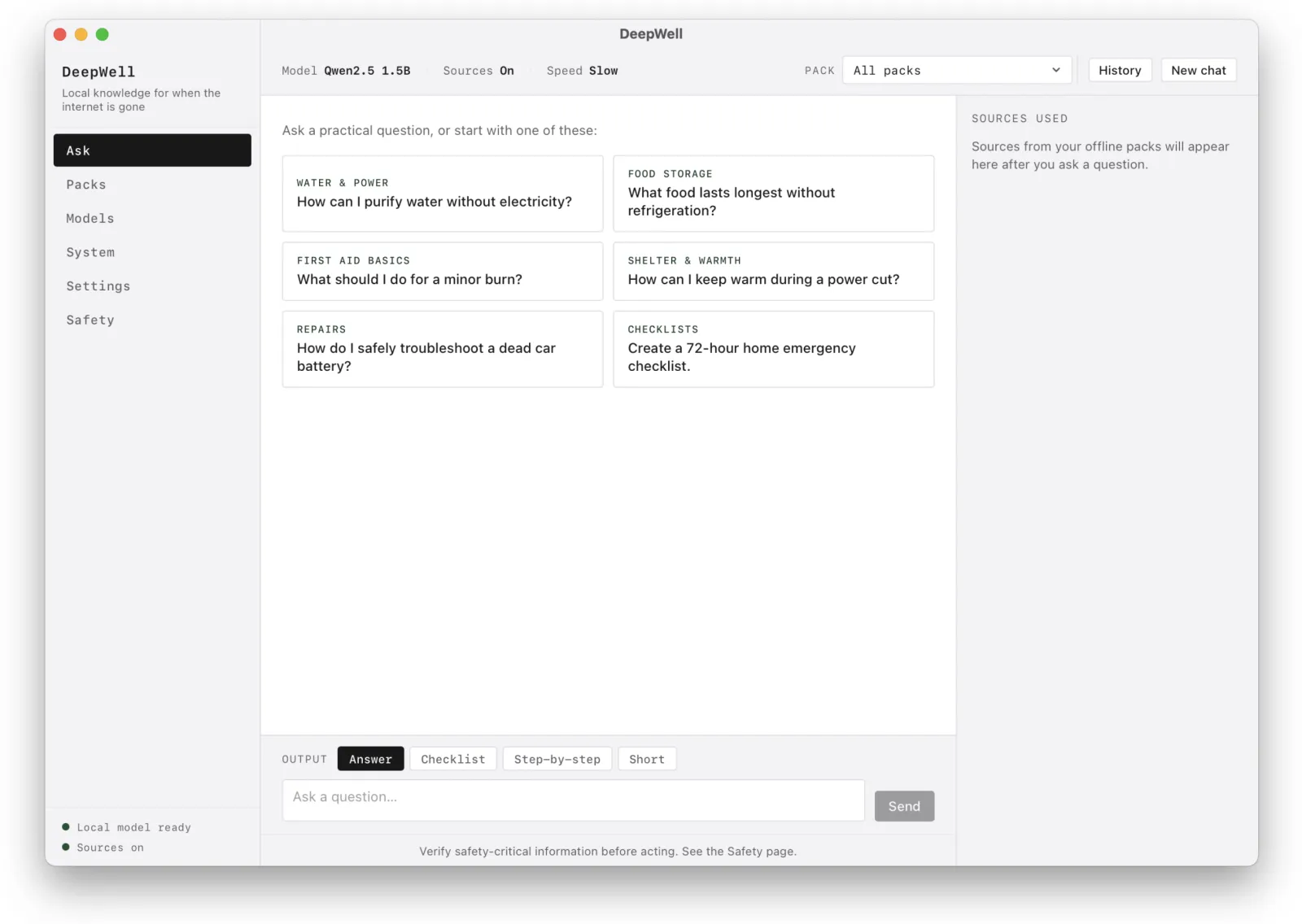
The DeepWell app on macOS, showing the Ask screen with practical example questions

Check your Mac in five seconds.

RAM is the deciding factor, and browsers can't read it reliably. So we detect what we can, then ask you to confirm one number. The minimum is 4 GB.

System check Detecting…
Operating system
Processor
CPU cores
Memory (RAM)
Confirm below
Confirm your memory
Apple menu → About This Mac → see Memory.

Knowledge that doesn't depend on a signal.

Storms, outages, off-grid stretches, a boat far from shore. DeepWell keeps answering when search engines can't load. It ships with searchable reference packs, and every answer cites the source it drew from.

Power is out

How do I keep food cold, run on a generator safely, and ration a battery through a multi-day cut?

Someone's hurt

What do I do for a burn, a deep cut, or a sprain when help is hours away?

Off the grid

How do I purify water, store food without refrigeration, and stay warm through the night?

Built-in knowledge packs
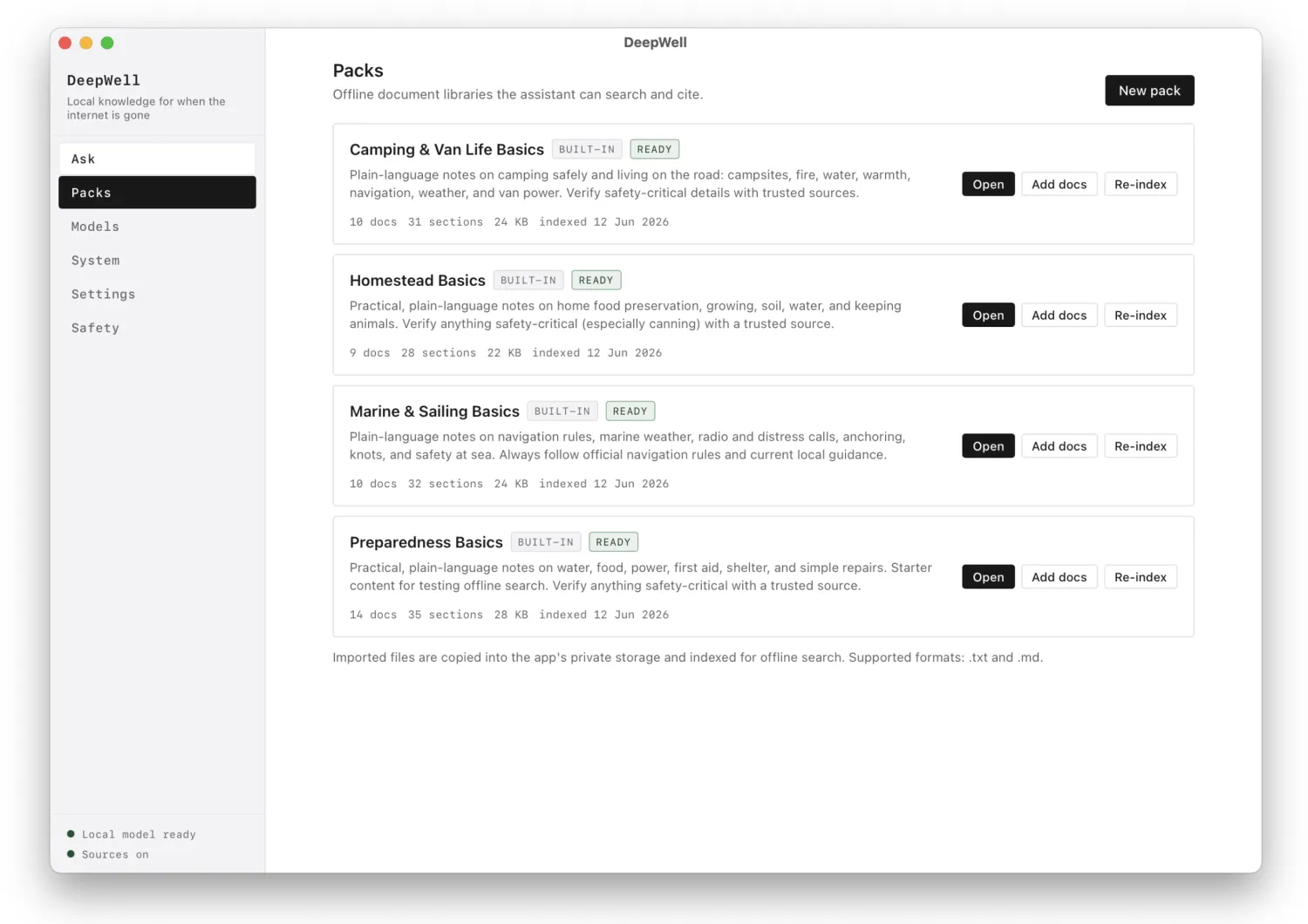
Camping & Van Life Basics Homestead Basics Marine & Sailing Basics Preparedness Basics
DeepWell Packs screen, listing built-in offline knowledge packs the assistant can search and cite
The Packs screen. Add your own documents too, everything stays offline.

Runs on the Mac you already have.

Most local-AI setups mean a terminal, Python, and hours of model wrangling. DeepWell is purpose-built for aging Intel hardware from 4 GB of RAM up. The hard parts, the engine, the model, the setup, are already handled.

No setup

Download, open, ask.

One file, around 1.1 GB with the model included. There is no terminal, no Python, no model files to find or convert. It works the moment it opens.

Old Macs welcome

Made for 2012 to 2017 Macs.

Give an aging Intel Mac a real second life. Answers are slower than cloud AI, but they are yours and they work with no connection at all.

Three steps, no account.

STEP 01

Download

Get the signed, notarized DMG and drag DeepWell into Applications.

STEP 02

Open

It opens like any Mac app. The model is already inside, ready to load.

STEP 03

Ask

Ask anything, or pick a knowledge pack. From here on, you can pull the plug on the internet.

Everything in one download.

Ships ready to use

Qwen2.5 1.5B, included.

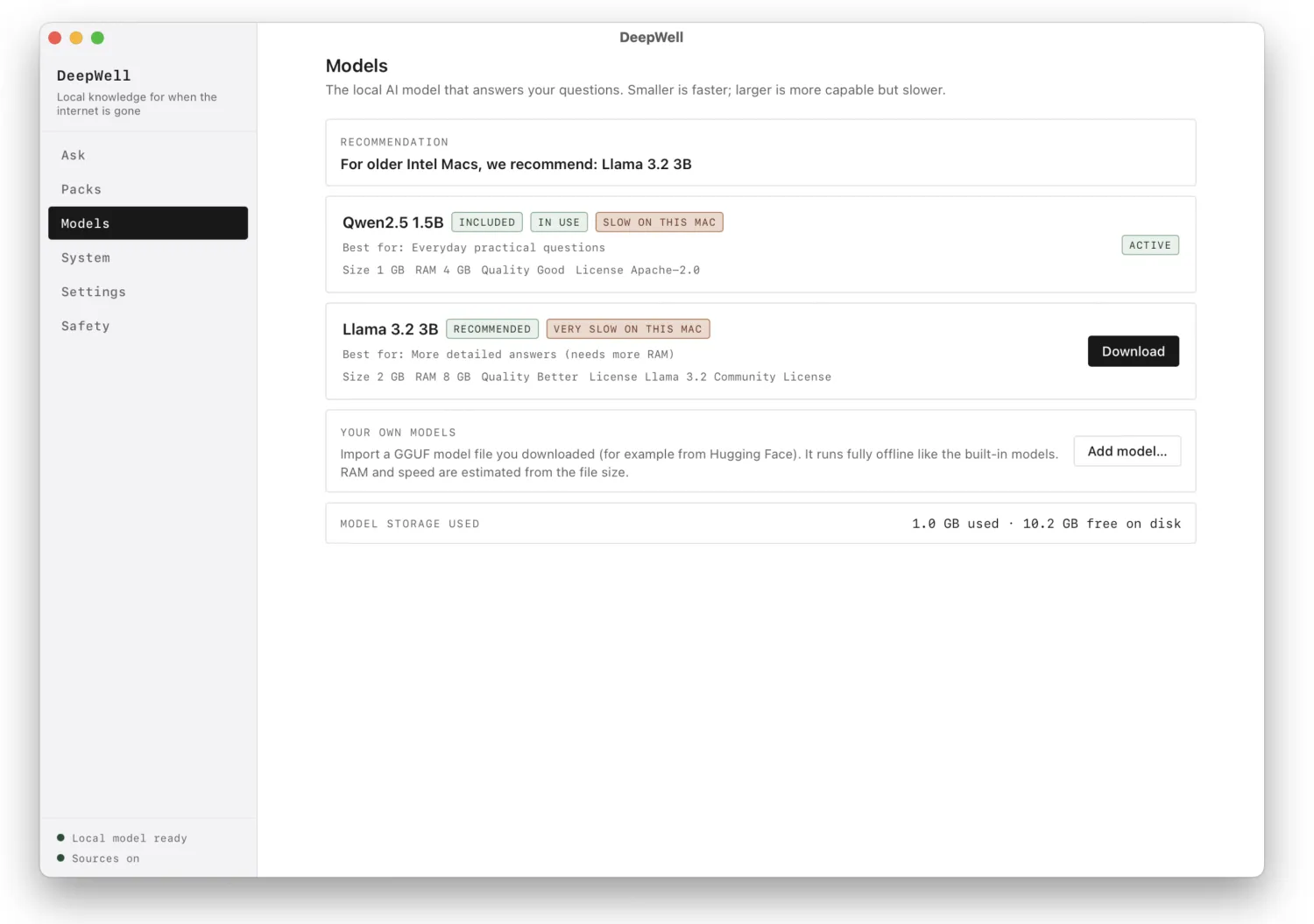
The app comes with the Qwen2.5 1.5B model built in (Apache-2.0, about 1 GB). It loads automatically on first launch and runs on any Mac with 4 GB of RAM. Nothing to download, nothing to set up.

Install more models

One-click bigger models.

Want stronger answers? Install a larger model like Llama 3.2 3B from inside the app with one click (a one-time download, best on 8 GB+ Macs). Switch between models any time.

Knowledge packs

Searchable, cited reference.

Built-in packs for camping & van life, homestead, marine & sailing, and preparedness. Answers cite the pack and passage they came from.

Bring your own

Your models and docs.

Import any GGUF model you like, and add your own reference documents so DeepWell can search and answer over the material you care about.

DeepWell Models screen, showing the included Qwen2.5 1.5B model active and a larger Llama 3.2 3B available to install
The Models screen. Qwen2.5 1.5B is included and active; install bigger models with one click.

What it is, and what it isn't.

DeepWell is a calm, useful field tool. It is not magic, and we would rather you trust it than be surprised by it.

Slower

It is slower than cloud AI. A small model on modest, offline hardware takes its time. The trade is that it always works, with no connection and no account.

Not a pro

It is not a doctor, lawyer, or engineer. Treat it as a knowledgeable starting point, not professional advice.

Verify

Check anything safety-critical. For medical, electrical, structural or marine decisions, confirm with the cited source and a qualified human where you can.

$19.99
Pay once. Yours to keep. No subscription.
Get DeepWell for Mac
macOS · Intel or Apple Silicon 4 GB RAM minimum ~1.1 GB download Apple Silicon runs via Rosetta today

Questions, answered plainly.

Is it really offline and private?
Yes. After you install it, DeepWell needs no internet at all. Your questions, chats, and any documents you add stay on your Mac. Nothing is sent to a server, because there is no server.
Which Macs does it run on?
Macs with at least 4 GB of RAM, both older Intel models (roughly 2012 onward) and Apple Silicon. On Apple Silicon it runs today through Rosetta, with a native build on the roadmap. Use the compatibility checker above to confirm.
Do I need to install anything technical?
No. There is no terminal, no Python, and no separate model download. It is a single signed and notarized app. Download, drag to Applications, open, and ask.
How accurate is it compared to ChatGPT or Claude?
A small local model is not as capable as a large cloud model, and it is slower. What it offers instead is privacy and the fact that it works with no connection. For its built-in knowledge packs, answers cite the source passage so you can verify them.
Can I use my own model or documents?
Yes. You can import your own GGUF model and switch to it, and you can add your own reference documents for DeepWell to search and answer over.
Is it a subscription?
No. It is a one-time payment of $19.99. You pay once and the app is yours.
Will it open without a security warning?
Yes. The app is signed with a Developer ID and notarized by Apple, so it opens with a normal double-click like any trusted Mac app.